Tutorial 14
Upload activities to Strava
Connect Strava and send completed Trace activities when you choose.
Overview
Trace can connect with Strava so you can upload finished sessions from Trace to your Strava account.
Steps
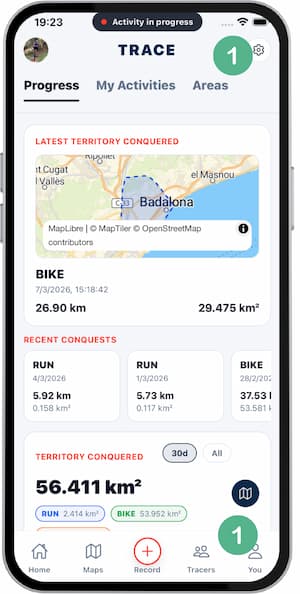
- Go to
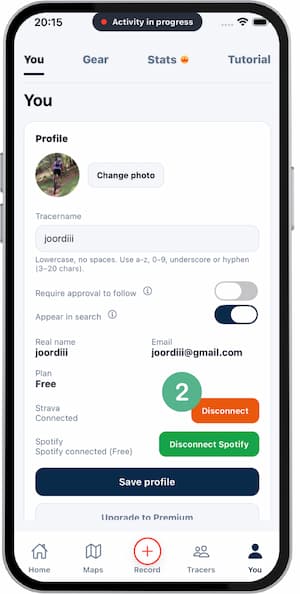
SettingsorYou(both screens take you to the same place). - Tap
Connect Strava. - Sign in to Strava and approve access.
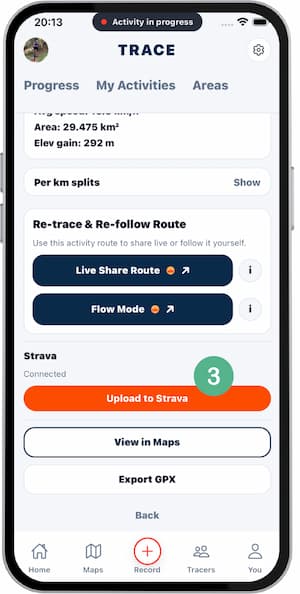
- Open a completed activity in Trace.
- Tap
Upload to Strava. - Confirm it appears in Strava.
Tips
- Review title and sport before uploading.
- Avoid uploading partial sessions.
- Reconnect if token access expires.
FAQ
What data is shared with Strava?
Route location, distance, time, and basic activity metadata within granted permissions.
Are all activities uploaded automatically?
Only based on the upload flow you trigger in the app.
Can I remove uploaded activities from Strava?
Yes, you can delete them directly in Strava.
Screenshots
Screenshots
Was this helpful?