Tutorial 12
Settings and You
Understand the general settings screen and where each key option lives.
Overview
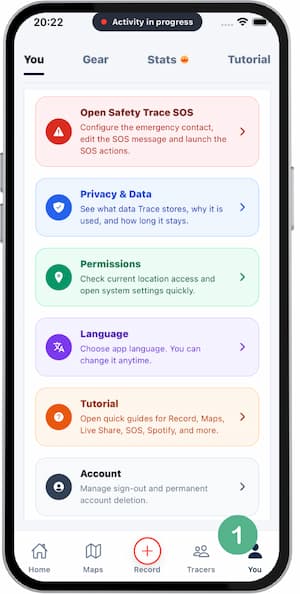
In Trace, Settings and You open the same place. This screen groups general options like Safety Trace SOS, Privacy & Data, Permissions, Language, Tutorial, and Account.
Steps
- Open
SettingsorYou(both routes open the same screen). - Review the general configuration cards.
- Open
Permissionsto check location access and jump to system settings if needed. - Open
Languageto change the app language. - Use
Tutorialto open quick guides for the main features.
Tips
- If tracking or GPS is failing, check
Permissionsfirst. - If you want to review data handling, open
Privacy & Data. - Use
Accountfor sign-out and account deletion actions.
FAQ
Are Settings and You different?
No. Both options take you to the same configuration panel.
Where can I change language?
In Language, inside this same screen.
Where do I review location permissions?
In Permissions, with direct access to system settings.
Screenshots
Screenshots
Was this helpful?