Tutorial 11
Export activities as GPX
Download your route files in GPX format for backup or reuse.
Overview
You can export activities as GPX to keep personal backups or share routes with compatible tools.
Steps
- Go to
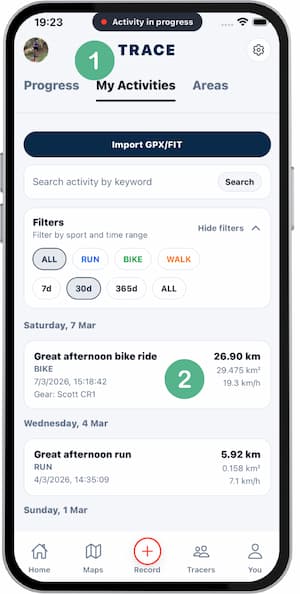
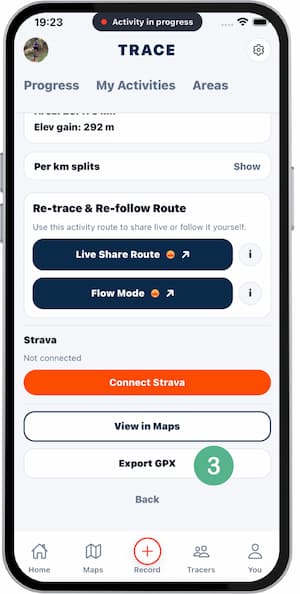
Activitiesand open the activity you want to download. - Scroll to the end of the activity detail.
- Tap
Export GPX. - Select where to save or share the file.
- Confirm the file opens correctly.
Tips
- Export important sessions regularly.
- Use date-based file names for easier sorting.
- Verify the file before sending it to others.
FAQ
What data does GPX include?
Route points, timestamps, and basic track structure.
Does GPX contain sensitive data?
It contains route location data, so share it carefully.
Can I import GPX back to Trace?
Yes, if your current flow supports GPX import.
Screenshots
Screenshots
Was this helpful?