Tutorial 1
Record an activity
Start, pause, and save activities in Trace without losing your route.
Overview
Trace records running, walking, and cycling sessions using GPS. Each saved session updates your routes, area, and stats.
Steps
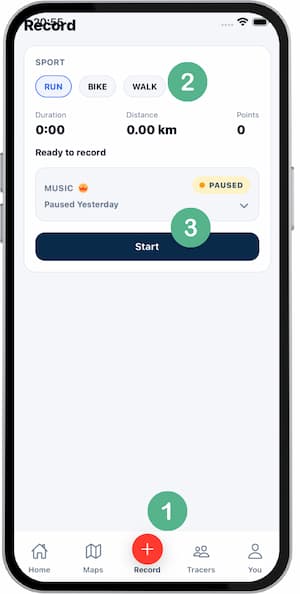
- Open Trace and go to
Record. - Choose your sport before starting.
- Wait for stable GPS signal.
- Tap
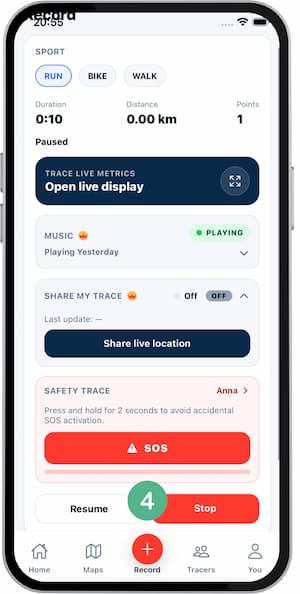
Startto begin tracking. - Use
PauseandResumewhen needed. - Tap
Stopwhen you finish. - Review the summary and save.
Tips
- Start in an open area for faster GPS lock.
- Pause during long stops to keep stats cleaner.
- Check battery before long sessions.
- Confirm tracking is still running if the screen is locked.
FAQ
What if I close the app by mistake?
Tracking may continue in background if the system does not kill the app.
Can I edit a saved activity?
You can edit basic metadata, but route data should stay unchanged.
Why does GPS take time to lock?
Indoor areas and dense buildings can delay GPS positioning.
Screenshots
Screenshots
Was this helpful?