Tutorial 4
Use Group Share
Share one live activity with multiple people and keep access under control.
Overview
Group Share lets multiple people follow or join a shared live activity. Use private distribution to keep the group secure.
Steps
- Start recording an activity and open
Share live location. - Select
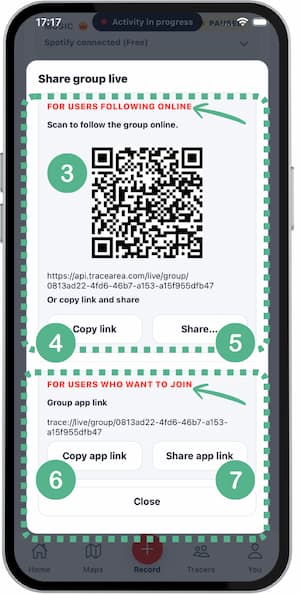
Share group live. - A pop-up opens with 2 options:
- Share your activity so someone can view it.
- Share via QR code (image 3).
- Share via link (images 4 and 5).
- Join the group.
- Join via invite link (images 6 and 7).
- Share your activity so someone can view it.
Tips
- Share access only in trusted channels.
- Regenerate link if the wrong person joins.
- Set roles before starting (leader, follower).
- End the session immediately when done.
FAQ
Can all participants see each other?
Yes, active participants in the same group can see shared positions.
Can someone just watch without joining?
Yes, depending on how you share access.
How do I improve privacy?
Use private sharing and avoid forwarding links publicly.
Screenshots
Screenshots
Live map with group participants
Screenshot coming soon
Was this helpful?