Tutorial 5
Set up and trigger SOS (Safety Trace)
Configure emergency contact settings and trigger SOS quickly during activity.
Overview
Safety Trace SOS helps you alert a trusted contact fast. The message can include your live location link for faster response.
Steps
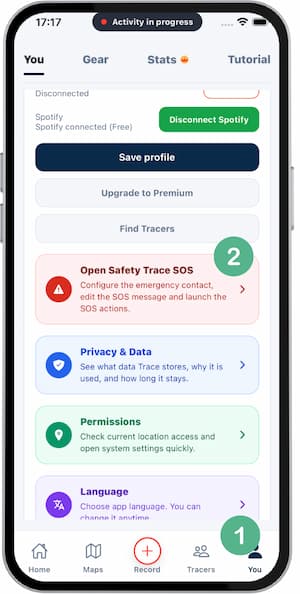
- Open
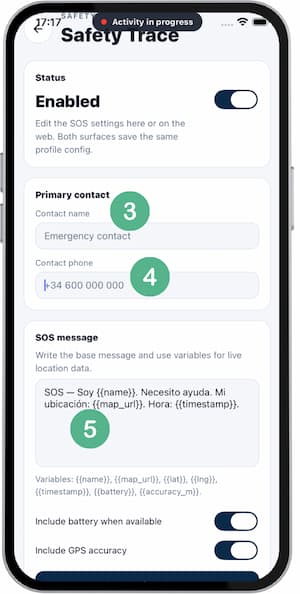
Settings > Safety Trace SOS. - Add a trusted emergency contact with name and phone.
- Review or customize the alert message.
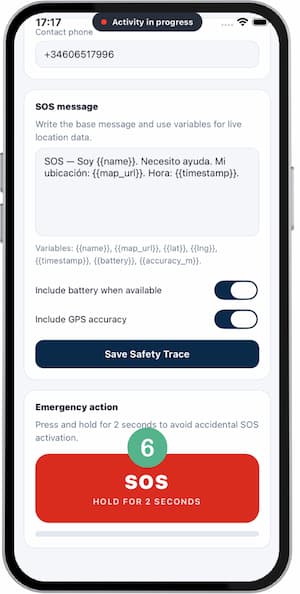
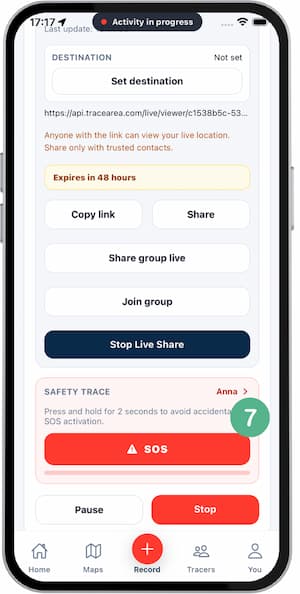
- If needed, the SOS button is available in 2 locations:
- At the bottom of the same configuration screen.
- On the activity recording screen.
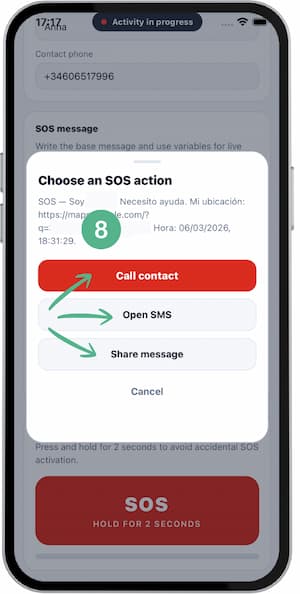
- Press and hold the button for 2 seconds; a pop-up opens and is ready to call or send a message to your saved contact.
Tips
- Test the SOS flow once before real use.
- Keep battery above a safe level for long routes.
- Tell your contact what SOS means in advance.
- Share only necessary location details.
FAQ
Does SOS include exact location?
It can include a live location link if enabled in your settings.
Can SOS trigger automatically?
No, it requires explicit user action to avoid false alarms.
Can I change the emergency contact later?
Yes, you can edit contact and message anytime in settings.
Screenshots
Screenshots
Was this helpful?