Tutorial 7
Use map views
Navigate route and territory maps to understand where you are training.
Overview
Maps is the core screen of TRACE. This is where the territory conquest idea lives.
It has 4 map modes:
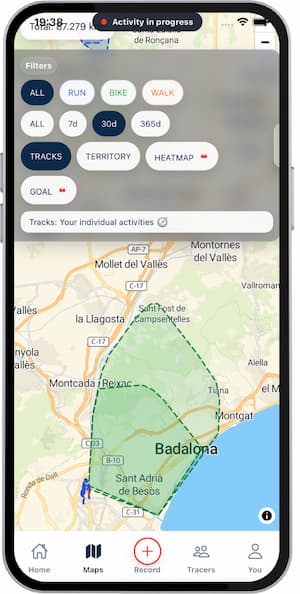
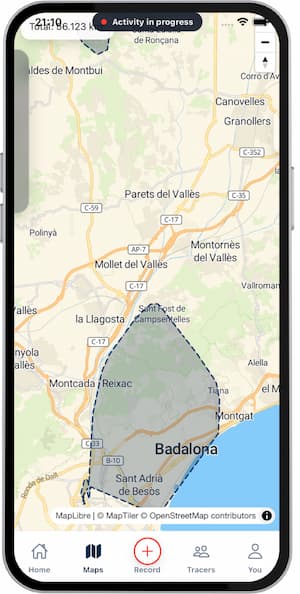
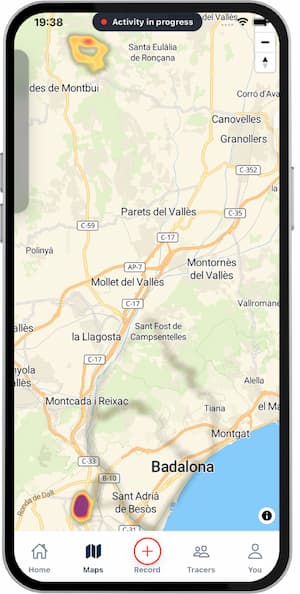
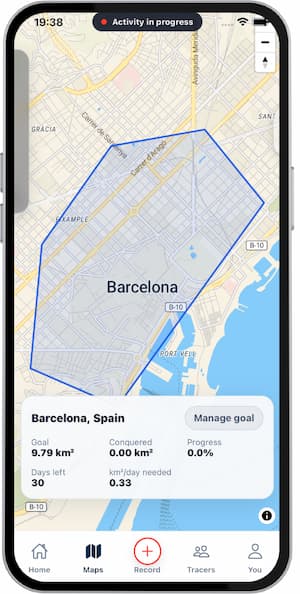
Tracks: individual recorded routes and filters.Territory: cumulative conquered area.Heatmap: frequency/intensity of where you move most.Goal: active territory goal and progress.
Steps
- Open
Maps. - Start in
Tracksto check saved routes and apply filters. - Switch to
Territoryto see what area is already conquered. - Open
Heatmapto identify repeated zones vs unexplored zones. - Open
Goalto track active conquest progress. - Use zoom/pan to plan your next session street by street.
Tips
- Use
Tracksto validate recent sessions quickly. - Use
Territoryto decide where to train next. - Use
Heatmapto break repetition patterns. - Use
Goalto stay focused on conquest progress.
FAQ
What is the difference between Tracks and Territory?
Tracks shows single routes. Territory shows accumulated coverage.
What is Heatmap useful for?
It highlights where you repeat more and where you still have low coverage.
Is Goal based on the other map views?
Yes, Goal is calculated from your real territory coverage.
Screenshots
Screenshots
Was this helpful?